Gantt Chart Maker Open App

Website redesign Gantt chart template

A 10-week website redesign covering audit, strategy, IA, design, development, content migration, QA, SEO redirects and launch, built around the SEO continuity that decides whether traffic survives the cutover.

Duration
10 weeks
Phases
6
Tasks
28
Format
.gantt
Website Redesign28 tasks · 6 phases · 10 weeks
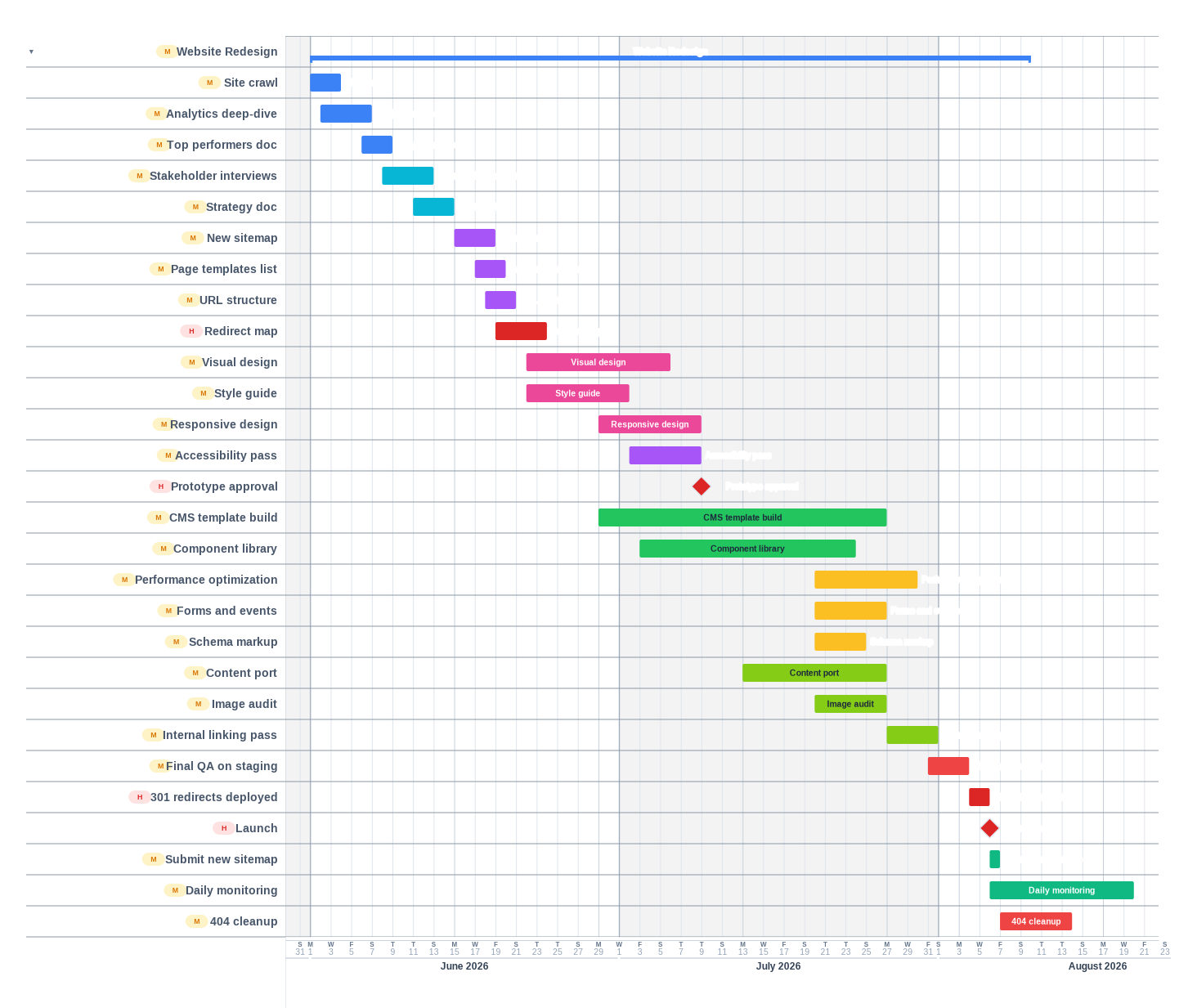
Website Redesign Gantt chart: 28 tasks across 6 phases over 10 weeks
The template as it opens in the app. Its example dates start on 1 June 2026. Change them to fit your project.

About this template

Website redesigns lose 20–60% of organic traffic when they ship without a redirect map. They lose conversion when the new design ships without the things that made the old design work. This 10-week template covers a typical marketing-site redesign: audit, IA, design, development, content migration, SEO continuity, and the post-launch monitoring window where traffic recovers or does not.

How a 10-week redesign breaks down

01

Audit and strategy

Weeks 1–2

Crawl the existing site (every URL, every page, every form). Pull analytics and search-console data: what pages drive traffic, what queries, what conversions. Document the things that are working so they are preserved in the new design. Strategy doc: redesign goals, success metrics, scope.

Steps in this phase
  • Full site crawl
  • Analytics and Search Console deep-dive
  • Document top-performing pages
  • Stakeholder interviews
  • Strategy doc and approval
02

Information architecture

Week 3

New sitemap based on user intent and the strategy doc. Page templates: how many distinct templates does the new site need (homepage, product, blog post, category, etc). URL structure decisions. Anything that changes URL has to land in the redirect map.

Steps in this phase
  • New sitemap
  • Page templates list
  • URL structure decisions
  • Redirect map (old → new)
  • Navigation plan
03

Design

Weeks 4–6

Visual design for each page template. Style guide: colors, typography, components, spacing. Responsive design (mobile-first usually). Accessibility designed in: color contrast, focus states, alt text plan. Prototype for stakeholder approval before development.

Steps in this phase
  • Visual design: homepage
  • Visual design: page templates
  • Style guide and design system
  • Responsive design
  • Accessibility design pass
  • Prototype and approval
04

Development

Weeks 5–9

Build the CMS templates, components, and pages. Set up the build pipeline. Performance budgets: target LCP under 2.5s, CLS under 0.1, INP under 200ms. Forms and conversion events configured. Schema markup re-applied.

Steps in this phase
  • CMS template build
  • Component library
  • Performance optimization
  • Forms and conversion events
  • Schema markup
  • Internal QA on staging
05

Content migration

Weeks 7–9

Move existing content into the new templates. This is rarely a clean port. Most content needs trimming or restructuring for the new layout. Audit images, alt text, internal links. Set up canonical tags.

Steps in this phase
  • Content port to new templates
  • Image audit and optimization
  • Alt text pass
  • Internal linking pass
  • Canonical tags
06

Launch and monitor

Week 10

Final QA, 301 redirects in place, sitemap submitted to Search Console, robots.txt updated. Launch (off-hours to minimize impact). Monitor rankings, traffic, and 404s daily for 2 weeks post-launch. Most ranking drops recover within 4–6 weeks if redirects are clean.

Steps in this phase
  • Final QA
  • 301 redirects deployed
  • Updated sitemap submitted
  • robots.txt updated
  • Launch (off-hours)
  • Daily monitoring for 14 days
  • 404 cleanup

Tips from redesigns that kept their traffic

  1. 01

    Build the redirect map BEFORE development starts. Every URL that changes needs a 301.

  2. 02

    Preserve high-performing pages. The redesign should not break things that already convert.

  3. 03

    Submit the new sitemap to Search Console on launch day. Faster re-indexing means faster recovery.

  4. 04

    Monitor 404s daily for the first 2 weeks. Missed redirects are the single biggest cause of traffic loss.

  5. 05

    Plan ranking recovery to take 4–6 weeks. Most rankings drop temporarily even with perfect redirects.

Questions

How long does a website redesign take?

8–16 weeks for most marketing-site redesigns. This template targets the 10-week middle case. E-commerce sites and product-heavy sites usually need 12–20 weeks.

What is the most common cause of traffic loss after redesign?

Missing or incorrect 301 redirects. Every URL that changes needs a 301; sites that skip this lose 20–60% of traffic.

Should I launch on a weekend?

Yes, or in the late evening. Off-hours launch minimizes user impact during the inevitable first-day issues.

Start with this template

Open the redesign template, fit it to your launch date, and you have a working 10-week plan with the SEO continuity steps that protect traffic.

Related templates

All 42 templates →