Gantt Chart Maker Open App

Mobile app development Gantt chart template

A 6-month mobile app build covering discovery, design, iOS and Android development, backend, testing, app-store review and launch, with the submission timeline that breaks most schedules.

Duration
6 months
Phases
6
Tasks
29
Format
.gantt
Mobile App Development29 tasks · 6 phases · 6 months
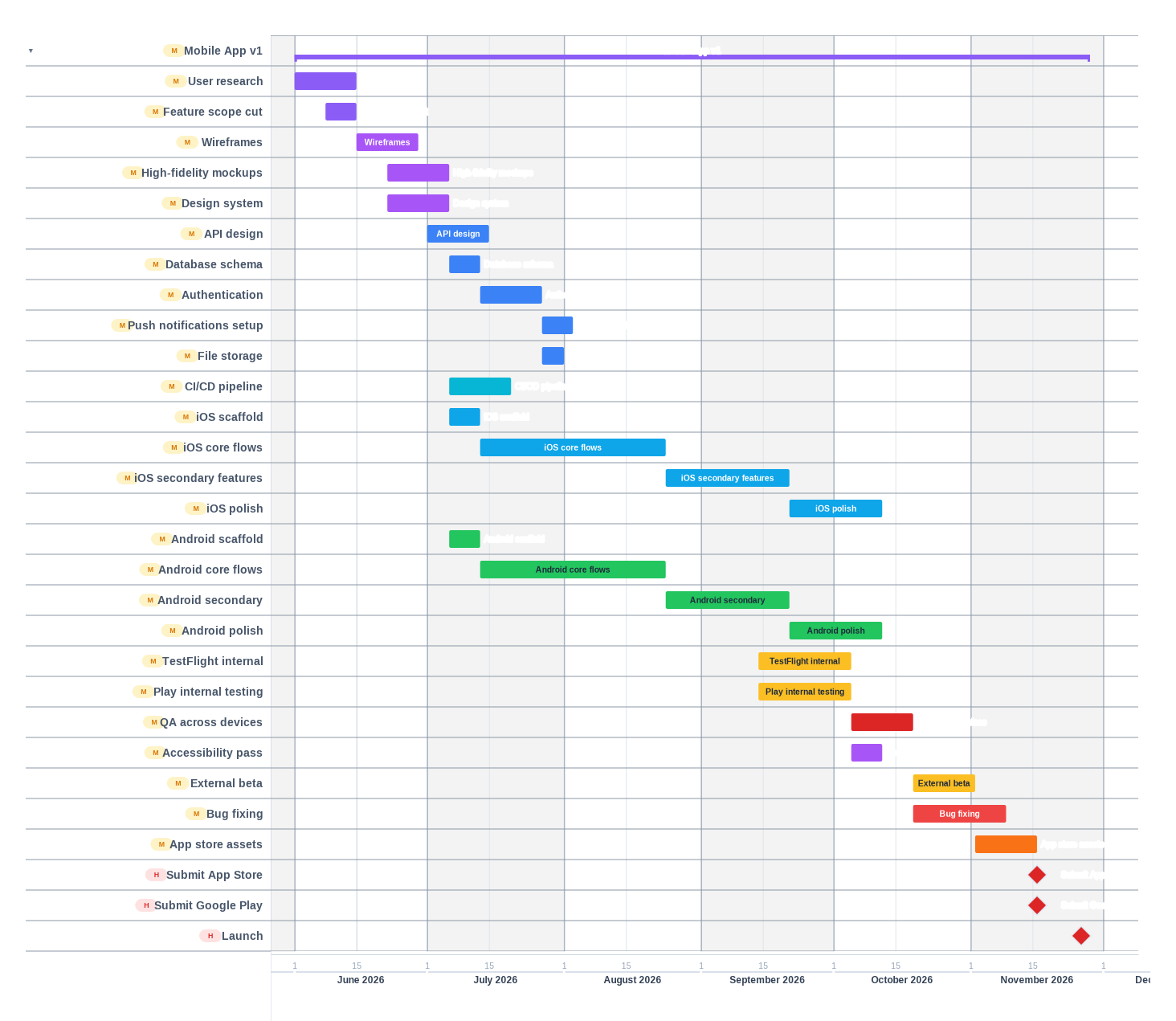
Mobile App Development Gantt chart: 29 tasks across 6 phases over 6 months
The template as it opens in the app. Its example dates start on 1 June 2026. Change them to fit your project.

About this template

Mobile apps are software with two extra constraints: dual-platform development and app-store approval. Apple's review queue is usually 1–3 days now but can stretch to a week, and rejection on a launch-week submission can shift the whole launch. This 6-month template covers a typical first-version app for iOS and Android with a backend API, with realistic time for both platforms and app-store submission.

How a 6-month mobile app build breaks down

01

Discovery and design

Month 1

User research, feature list, scope cut. Wireframes for every screen. High-fidelity design for primary flows. Design system: colors, typography, components. iOS and Android often share design language but follow each platform's conventions (tab bar vs. bottom nav patterns, etc).

Steps in this phase
  • User research and interviews
  • Feature list and scope cut
  • Wireframes (every screen)
  • High-fidelity mockups
  • Design system
  • Prototype clickthroughs
02

Backend foundation

Months 2–3

API design (REST or GraphQL). Database schema. Authentication (email, OAuth, Sign in with Apple: required if you offer other social sign-ins). Push notification infrastructure (APNS for iOS, FCM for Android). File storage. Hosting and CI/CD.

Steps in this phase
  • API design
  • Database schema
  • Authentication
  • Push notifications (APNS, FCM)
  • File storage
  • CI/CD pipeline
03

iOS development

Months 2–5

Swift or React Native. Build core flows first, polish later. Use TestFlight for internal builds from week 4. Test on real devices: simulator does not catch performance, battery, or network-edge issues. Plan for at least 3 supported iOS versions.

Steps in this phase
  • Project scaffold
  • Core flows
  • Secondary features
  • iOS-specific polish (haptics, animations)
  • TestFlight internal
  • TestFlight external beta
04

Android development

Months 2–5

Kotlin or React Native (same codebase). Match the iOS feature set. Test across multiple Android versions and device sizes: fragmentation is real. Material Design 3 components. Use Google Play internal testing track for builds.

Steps in this phase
  • Project scaffold
  • Core flows
  • Secondary features
  • Android-specific polish
  • Google Play internal testing
  • Google Play closed beta
05

Test and polish

Month 5

QA across devices and versions. Accessibility pass: VoiceOver (iOS), TalkBack (Android), dynamic type, color contrast. Performance: cold start, scroll, memory. Beta cohort of 50–200 testers across both platforms.

Steps in this phase
  • QA across devices
  • Accessibility pass
  • Performance optimization
  • Beta cohort feedback
  • Bug fixing
06

App-store submission and launch

Month 6

App-store assets: screenshots (multiple device sizes), preview videos, description, keywords. Privacy nutrition labels for iOS. Data safety form for Android. Submit to both stores at the same time: Apple review is 1–3 days; Google Play is usually a few hours. Plan a buffer week for rejections.

Steps in this phase
  • App-store screenshots and copy
  • iOS privacy nutrition labels
  • Android data safety form
  • Submit to App Store
  • Submit to Google Play
  • Address review feedback if rejected
  • Launch in both stores

Tips from shipped mobile apps

  1. 01

    Submit to both stores 2 weeks before public launch. The buffer absorbs rejections without shifting launch.

  2. 02

    Test on real devices from week 4. Simulators do not catch battery, performance, or network-edge issues.

  3. 03

    Add Sign in with Apple if you offer any other social sign-in. App Store guidelines require it.

  4. 04

    Plan privacy nutrition labels early. Last-minute label discovery slows submission.

  5. 05

    Use the platform conventions. iOS-on-Android-tab-bar is a small but real reviewer flag.

Questions

How long does mobile app v1 take?

4–9 months for native iOS + Android, depending on feature scope. This template targets the 6-month middle case. Cross-platform (React Native, Flutter) shortens by 20–30%.

How long is App Store review?

1–3 days for most submissions in 2026. First submissions are sometimes longer. Plan 1 week of buffer for potential rejections.

Should I launch both platforms at the same time?

Yes if possible: splitting press across two launches reduces impact. Submit both, sync the actual public launch date.

Start with this template

Open the mobile app template, fit it to your launch date, and you have a working 6-month plan with both platforms and app-store submission plotted.

Related templates

All 42 templates →