Gantt Chart Maker Open App

Content calendar Gantt chart template

A 90-day content calendar for blog posts, newsletters, social and video, with research, drafting, editing, design and publishing plotted so nothing slips and nothing duplicates.

Duration
90 days
Phases
5
Tasks
29
Format
.gantt
Content Calendar29 tasks · 5 phases · 90 days
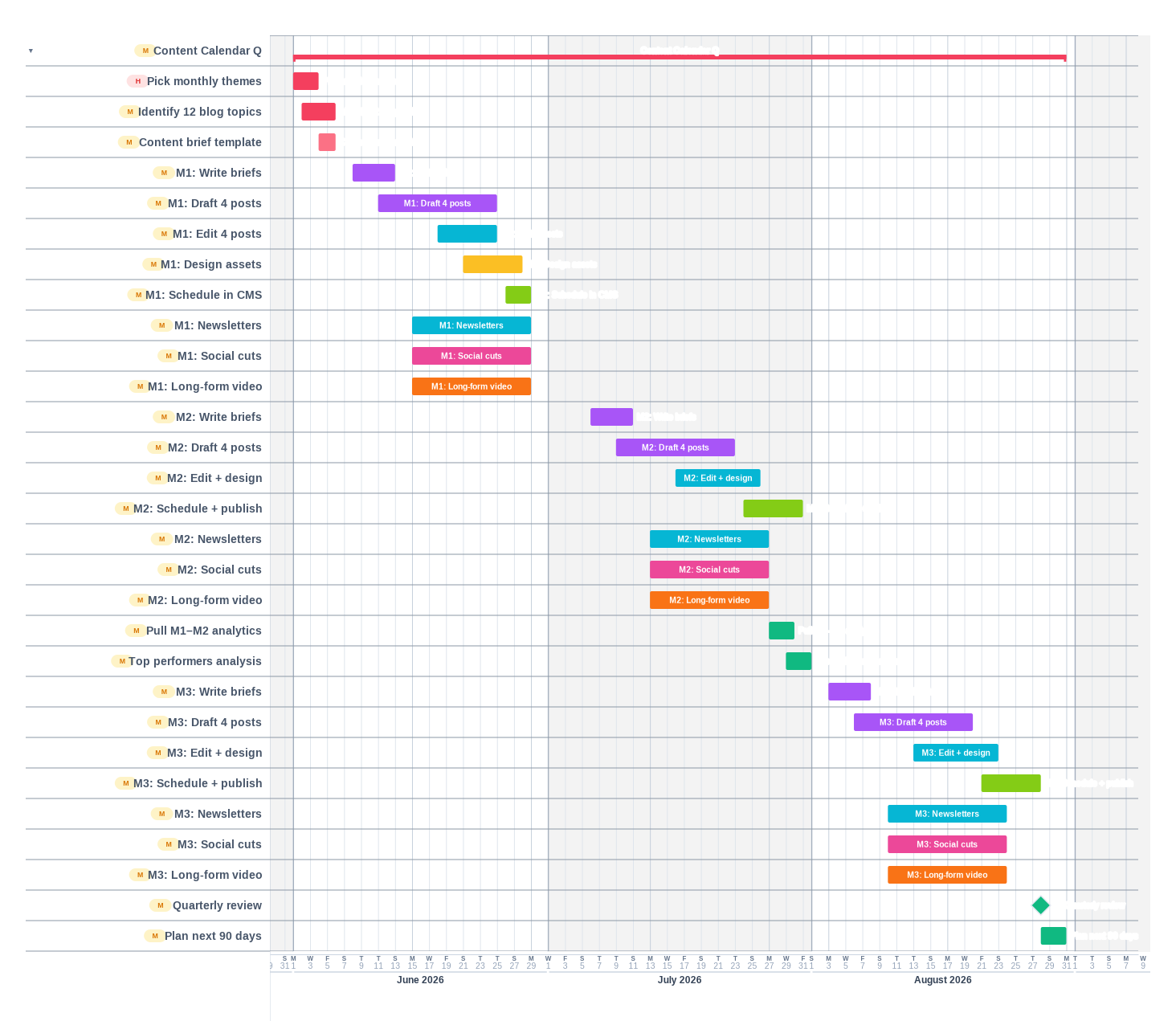
Content Calendar Gantt chart: 29 tasks across 5 phases over 90 days
The template as it opens in the app. Its example dates start on 1 June 2026. Change them to fit your project.

About this template

Content calendars fail in two predictable ways: every post is late because nothing was started early enough, or every post looks the same because there is no thematic variety. This 90-day template plots a typical content cadence (12 blog posts, 12 newsletters, daily social, 4 long-form videos) across research, drafting, editing, design and publishing phases. Themes rotate monthly to maintain variety.

How a 90-day content calendar breaks down

01

Plan and theme

Week 1

Pick 3 monthly themes that align with business goals. Identify 12 blog topics (4 per month). Build the content brief template. Sketch the editorial calendar: which post on which date. Block 2–3 hours per week for content reviews.

Steps in this phase
  • Pick 3 monthly themes
  • Identify 12 blog topics
  • Build content brief template
  • Block editorial review slots
  • Set publishing schedule (e.g. Tue, Thu)
02

Month 1: Build the pipeline

Weeks 2–5

Write briefs for all 4 month-1 blog posts at once. Draft, edit, design, schedule each on a 2-week cycle. By the end of month 1 you should be 1 month ahead: never publishing what was drafted yesterday.

Steps in this phase
  • Write 4 blog briefs
  • Draft 4 blog posts
  • Edit 4 blog posts
  • Design assets for each
  • Schedule in CMS
  • Build the social cuts and newsletter
03

Month 2: Steady rhythm

Weeks 6–9

By month 2 the pipeline runs at full cadence. Continue 4 blog posts per month. Send a newsletter every other week. Daily social posts using social cuts from the long-form content (one blog post fuels 5–10 social posts).

Steps in this phase
  • 4 blog posts (drafted, edited, designed, scheduled)
  • 2 newsletters
  • ~30 social posts
  • 1 long-form video
04

Month 3: Optimize and double down

Weeks 10–13

Pull the analytics from months 1 and 2. Identify the top 3 performing posts: what worked, what was the format, what was the topic. Double down on the format and topic for month 3. Drop or change underperforming themes.

Steps in this phase
  • Pull analytics months 1–2
  • Identify top 3 performing posts
  • Update theme plan if needed
  • Continue 4 blog posts
  • 2 newsletters
  • ~30 social posts
  • 1 long-form video
05

Reflect and plan next quarter

Week 14

Quarterly review: what hit, what flopped, what drove email signups, what drove revenue. Build the next 90-day plan informed by what just worked.

Steps in this phase
  • Quarterly review meeting
  • Top performers post-mortem
  • Identify next 3 themes
  • Build next 90-day plan

Tips from content calendars that ran clean

  1. 01

    Be one month ahead at all times. Publishing what was drafted yesterday is how teams burn out.

  2. 02

    One long-form piece per week, repurposed into 5–10 social posts. Repurposing beats new creation 10:1.

  3. 03

    Pick themes that map to business goals. Random topics produce random results.

  4. 04

    Track top performers monthly. Doing more of what works is faster than reinventing.

  5. 05

    Block editorial review slots in the calendar before the quarter starts. Otherwise reviews get bumped indefinitely.

Questions

How many blog posts per month is right?

Most B2B content programs run 4–8 posts per month. Less than 2 is hard to build an audience; more than 12 dilutes quality.

How far ahead should I plan?

Topic-level: 3 months ahead. Specific drafts: 1 month ahead. The closer to publishing, the more specific.

Should I batch produce?

Yes. Batching saves 30–40% of total time vs. one-off production. Group all drafts, then all edits, then all designs.

Start with this template

Open the content calendar template, fit it to your publishing cadence, and you have a working 90-day plan with the editorial workflow plotted.

Related templates

All 42 templates →