Gantt Chart Maker Open App

Sprint planning Gantt chart template

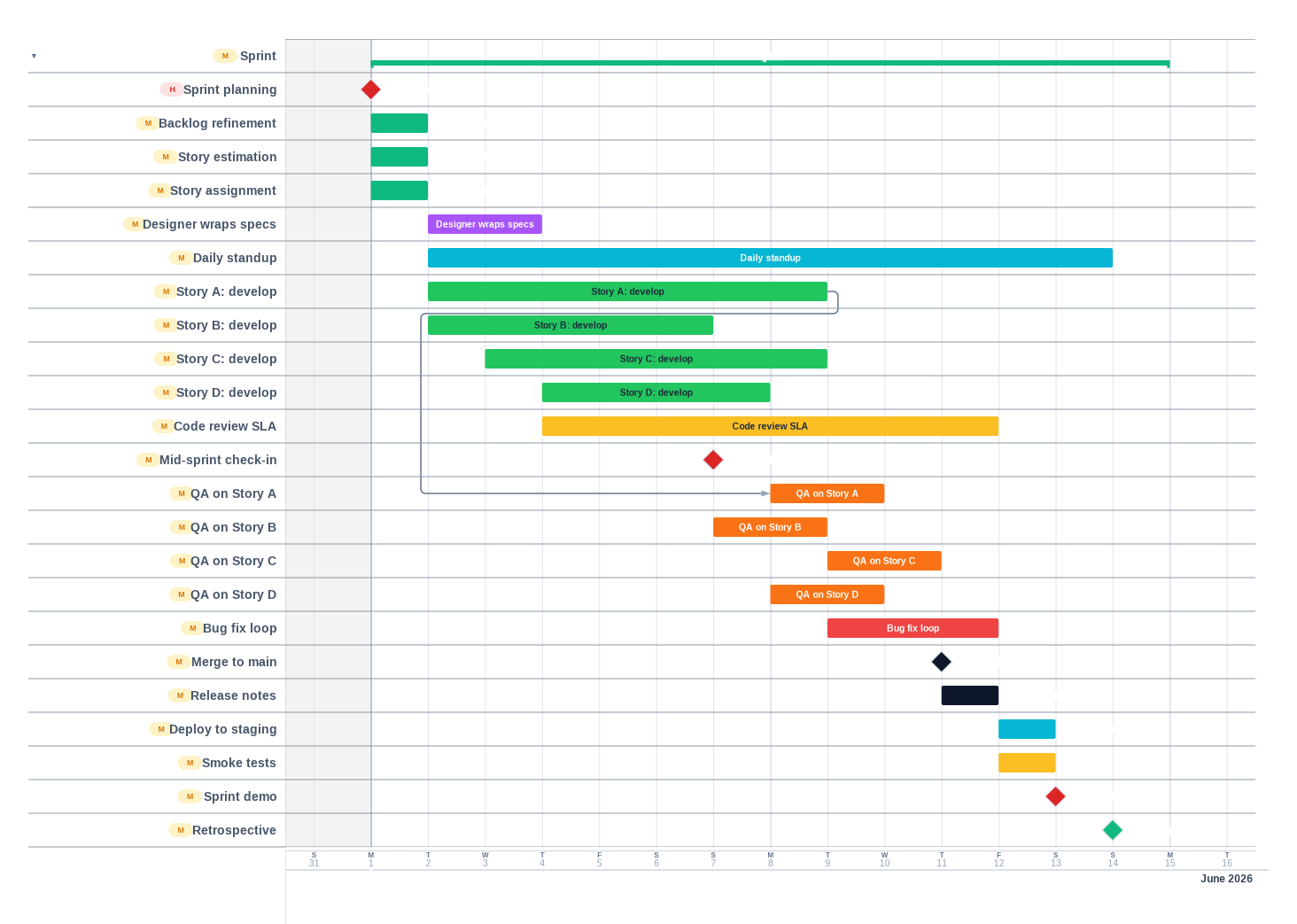
A 2-week agile sprint drawn as a Gantt chart: planning, daily standups, design, development, code review, QA, demo and retrospective, for teams who want sprint dates and dependencies in one view.

Duration
2 weeks
Phases
5
Tasks
23
Format
.gantt
Sprint Planning23 tasks · 5 phases · 2 weeks
Sprint Planning Gantt chart: 23 tasks across 5 phases over 2 weeks
The template as it opens in the app. Its example dates start on 1 June 2026. Change them to fit your project.

About this template

Most teams plan sprints in Jira tickets and a backlog, then lose track of when each piece is actually shipping. A Gantt view of a single sprint surfaces the real schedule: when design hands off to engineering, when each story is in review, when QA picks it up, when the demo is. This 2-week template can be cloned for every sprint or used to plan a longer release as a chain of sprints.

How a 2-week sprint breaks down

01

Sprint kickoff

Day 1

Sprint planning meeting: review backlog, story estimates, capacity vs. velocity, sprint goal. Confirm everyone has their stories assigned. End with a single-sentence sprint goal that anyone on the team can recite.

Steps in this phase
  • Backlog refinement
  • Story point estimation
  • Capacity vs. velocity check
  • Story assignment
  • Sprint goal
02

Days 2–4: Design and start

Days 2–4

Designers wrap any remaining specs. Engineers start the largest stories first (move the risk forward in the sprint). Daily standup at the same time every day: 15 minutes, three questions per person.

Steps in this phase
  • Daily standup
  • Designer hands off specs
  • Engineers start largest stories
  • PR template and review SLAs confirmed
03

Days 5–8: Build

Days 5–8

Heads-down development. Code reviews happen continuously (target: PR open less than 24 hours before first review). Mid-sprint check-in on day 7: flag any story at risk of slipping.

Steps in this phase
  • Daily standup
  • Code reviews (24h SLA)
  • Mid-sprint check-in (day 7)
  • Re-scope at-risk stories
04

Days 9–11: QA and merge

Days 9–11

Stories complete and ready for QA. Bug fixes from QA loop back to developers. By end of day 11, every shippable story is merged. Anything that did not land moves back to the backlog.

Steps in this phase
  • QA pass on completed stories
  • Bug fix loop
  • Merge to main
  • Update release notes
05

Days 12–14: Demo and retro

Days 12–14

Day 12: deploy to staging, smoke test. Day 13: sprint demo to stakeholders, where every story owner presents their work. Day 14: retrospective on what went well, what slowed us down, and what to try next sprint. Schedule the next sprint kickoff.

Steps in this phase
  • Deploy to staging
  • Smoke tests
  • Sprint demo
  • Retrospective
  • Next sprint kickoff

Tips from teams running smooth sprints

  1. 01

    Start the largest story first. Move risk forward in the sprint, not later.

  2. 02

    Open every PR within 24 hours of the work being ready. PRs sitting unopened are silent delays.

  3. 03

    Hold the mid-sprint check-in on day 7. Stories at risk on day 7 are still salvageable; on day 12 they are not.

  4. 04

    End every retrospective with one concrete change for next sprint. Lists of 15 ideas produce zero changes.

  5. 05

    Run the demo even if half the stories did not land. Showing partial work creates pressure to ship.

Questions

Is Gantt useful for agile sprints?

Yes: for a single sprint view, it makes story sequencing and handoffs visible in a way a Kanban board does not.

Should I do this for every sprint?

A single sprint Gantt is most useful for the first 3–5 sprints of a new team, or for any sprint with cross-functional dependencies.

Can I chain multiple sprints into a release plan?

Yes. Open this template, then add 2–3 more 2-week blocks for a release-level view.

Start with this template

Open the sprint template, set day 1, and you have a working 2-week sprint plan with handoffs and ceremonies plotted.

Related templates

All 42 templates →