Gantt Chart Maker Open App

Webinar planning Gantt chart template

An 8-week B2B webinar plan covering topic, speakers, platform, registration page, promotion, the live event, and the follow-up that turns attendees into pipeline.

Duration
8 weeks
Phases
5
Tasks
16
Format
.gantt
Webinar Planning16 tasks · 5 phases · 8 weeks
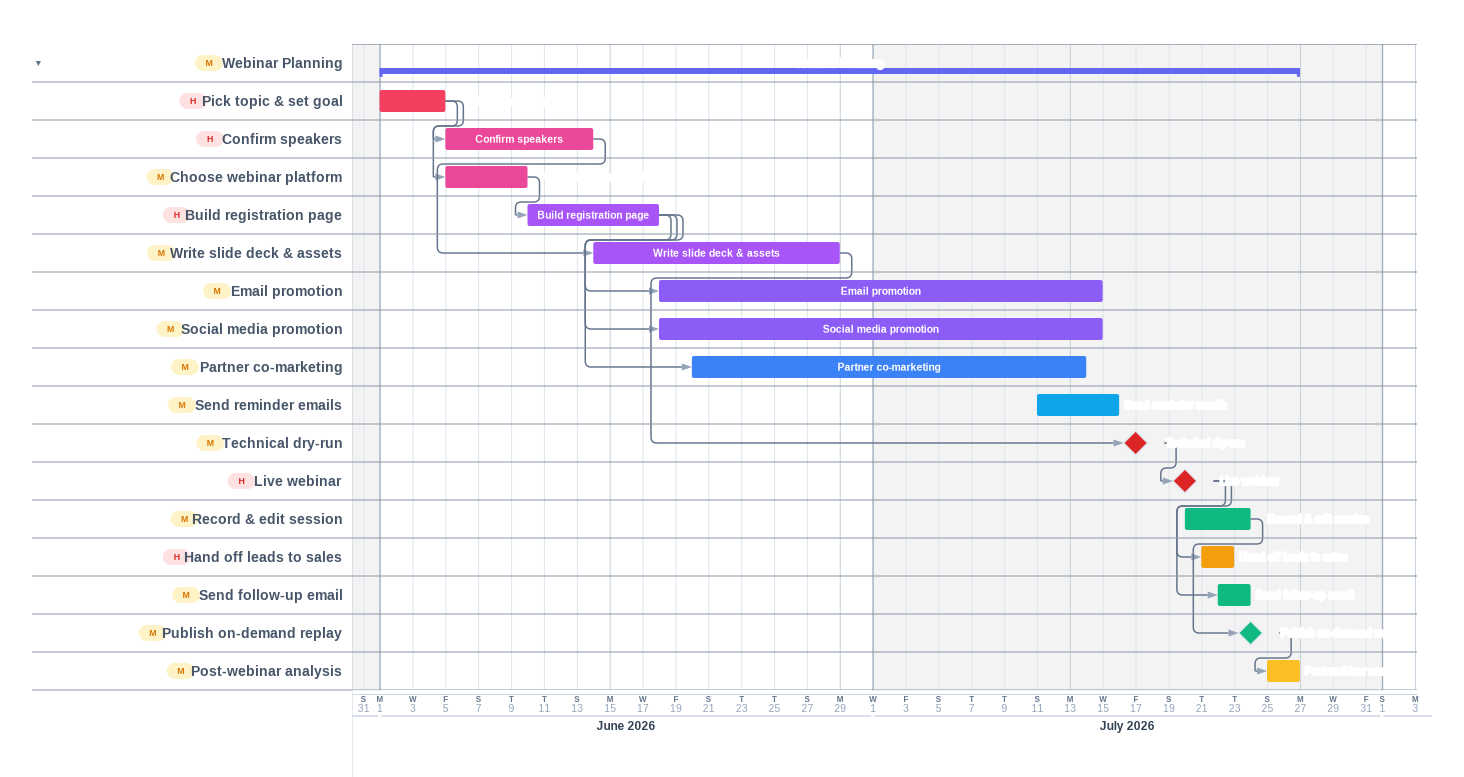
Webinar Planning Gantt chart: 16 tasks across 5 phases over 8 weeks
The template as it opens in the app. Its example dates start on 1 June 2026. Change them to fit your project.

About this template

A B2B webinar looks simple from the outside: book a date, send some emails, show up. The projects that generate real pipeline treat it like a product launch with a hard deadline. Speakers cancel, platforms have setup quirks you only find in a dry run, and registration pages need weeks in the wild before the list is big enough to matter. This 8-week template starts with the topic and the goal, then builds outward through speaker confirmation, the registration page, and the slide deck, before a month of promotion across email, social, and partner channels ahead of the technical rehearsal and the live event. It ends with what most B2B teams skip: fast lead handoff and a real post-event report.

How an 8-week webinar plan breaks down

01

Week 1: Lock the topic, goal, and speakers

Week 1

The only two decisions that matter before anything else: what the webinar is about and what it needs to accomplish (pipeline, adoption, retention, or awareness). Once those are locked, speaker outreach and platform selection can run in parallel: outreach because good speakers get booked elsewhere fast, and platform because the registration page in week 2 depends on it being chosen.

Steps in this phase
  • Pick the topic and define the single primary goal
  • Reach out to speaker candidates
  • Choose and set up the webinar platform
  • Draft a rough run-of-show outline
02

Weeks 2–3: Build the page, deck, and assets

Weeks 2–3

With speakers confirmed and a platform chosen, three things move at once: the registration page goes live (the earlier this happens, the longer your promotion runway), the deck gets written around the confirmed speaker content, and supporting assets (email banners, social tiles, a partner one-pager) get designed so promotion can start the moment the page is up.

Steps in this phase
  • Confirm all speakers and collect bios and headshots
  • Build and publish the registration/landing page
  • Write the slide deck
  • Design promotional assets for email, social, and partners
03

Weeks 3–6: Promote across every channel

Weeks 3–6

This is the longest phase and the one that decides attendance. Email, social, and partner promotion all run concurrently rather than in sequence: partners need a few extra days to get your assets into their own newsletters and channels. Track registrations weekly; if a channel underperforms by week 4, shift budget or ask a partner for a second send rather than waiting it out.

Steps in this phase
  • Launch the email promotion sequence
  • Run the social media campaign
  • Send partner co-marketing assets and confirm a send date
  • Track registrations weekly and adjust channels or spend
04

Week 7: Final prep and the dry-run

Week 7

Reminders go out to registrants, but the load-bearing task is the technical dry-run: every speaker, on the real platform, with screen-share, audio, and slide-advance all tested, not a stand-in tool. This is also when the run-of-show gets finalized: exact timing, who moderates Q&A, and who has the backup contact if a speaker's connection drops.

Steps in this phase
  • Send reminder emails to registrants
  • Run the full technical dry-run with every speaker
  • Finalize the run-of-show and Q&A moderation plan
  • Brief speakers on timing and the backup contact
05

Week 8: Go live and convert attendees into pipeline

Week 8

The event itself is one day; everything downstream is where B2B webinars actually pay off or don't. Recording and editing happen immediately so the follow-up email and on-demand replay can go out within a day or two, and leads get handed to sales within 48 hours, while the conversation is still warm, followed by a short report on attendance, engagement, and pipeline.

Steps in this phase
  • Run the live webinar
  • Record and edit the session
  • Hand off attendee and no-show lists to sales
  • Send the follow-up email and publish the on-demand replay
  • Write the post-event analysis and report

Tips from B2B teams that run webinars often

  1. 01

    Pick one goal before you pick a topic. A webinar built for pipeline looks different from one built for product adoption or thought leadership, and trying to do all three dilutes the content and the follow-up.

  2. 02

    Confirm every speaker in writing with a specific date and a backup plan. The most common last-minute failure is a speaker double-booking themselves two weeks out.

  3. 03

    Open registration at least 4 weeks before the date. Signups trickle in early and spike in the final 3 days, so you need both windows to hit your number.

  4. 04

    Run the technical dry-run on the actual platform with every speaker, not a stand-in tool. Screen-share permissions, audio routing, and slide-advance controls all behave differently platform to platform.

  5. 05

    Budget for a 40–50% no-show rate on registrants. Promote to 2–3x your attendance target, not the target itself.

  6. 06

    Send the lead list to sales within 48 hours while the conversation is still warm. A week-old webinar lead converts at a fraction of the rate of a same-day one.

Questions

How far in advance should I start planning a B2B webinar?

8 weeks works well for a single-speaker or small-panel webinar with an existing email list. Add 2–4 weeks if you are recruiting outside speakers or building an audience from scratch.

What is the single most common scheduling mistake?

Locking the date and publishing the registration page before speakers are confirmed. If a key speaker cancels afterward, you either delay publicly or scramble for a replacement: both look worse than waiting one extra week to confirm first.

Can I open this template and customize it?

Yes. Click "Open this template in the app". It loads instantly, and you can drag, rename, and re-color every task. The app runs entirely in your browser. Your data never leaves the device.

Start with this template

Open the webinar template, drag the bars to fit your date, and you have a working 8-week promotion and follow-up plan in under a minute. No signup, no account, no upload.

Related templates

All 42 templates →