Gantt Chart Maker Open App

Event planning Gantt chart template

A 10-week event plan covering budget, venue, vendors, program, marketing and ticketing, guest RSVPs, staffing, day-of logistics and the wrap-up, for anyone running an in-person event of 100 to 500 guests.

Duration
10 weeks
Phases
5
Tasks
19
Format
.gantt
Event Planning19 tasks · 5 phases · 10 weeks
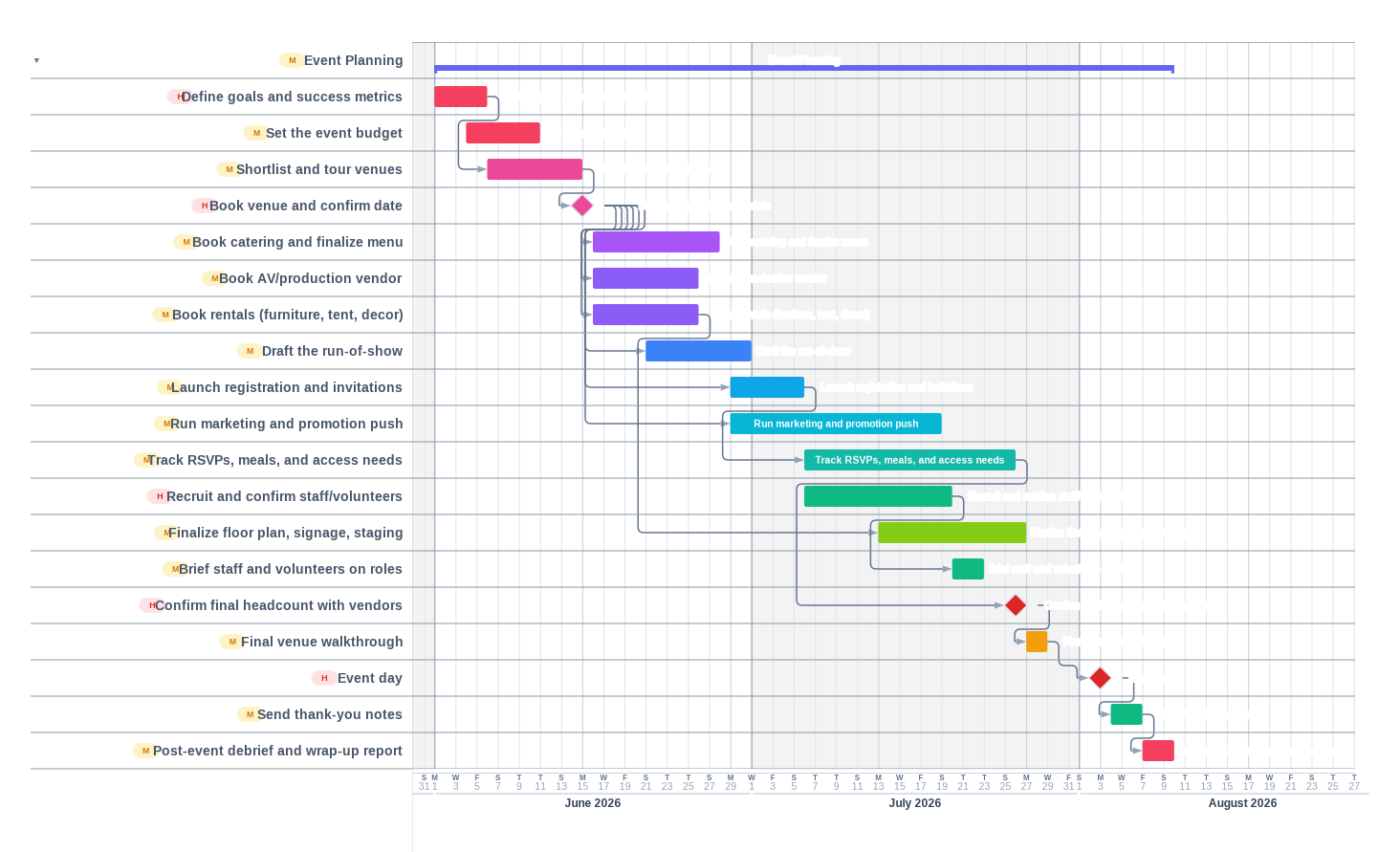
Event Planning Gantt chart: 19 tasks across 5 phases over 10 weeks
The template as it opens in the app. Its example dates start on 1 June 2026. Change them to fit your project.

About this template

Planning a mid-size event, whether a company gala, a product-launch party or a community festival, means juggling a fixed date against a long list of vendors who all need lead time: caterers, AV crews, rental companies, and staffing agencies. Ten weeks works if you lock the big-ticket decisions first (goals, budget, venue, date) and let marketing, ticketing and guest management run in parallel behind them. The tightest constraints are usually the venue and the catering headcount deadline; almost everything else (signage, staffing, the run-of-show) compresses into the final two weeks. This template lays out a realistic 10-week timeline for a 100 to 500 guest event, with the dependencies that actually cause delays. Open it in the app and drag any bar to fit your date.

How a 10-week event plan breaks down

01

Weeks 1–2: Goals, budget, and venue

Weeks 1–2

Every decision downstream depends on three things: what success looks like, how much you can spend, and where it happens. Define the purpose of the event and a short list of success metrics, then build a line-item budget with a contingency built in. Venue and date get locked here too, for a 100–500 guest event, popular venues book out 6–10 weeks ahead, so touring and signing early protects the rest of the schedule.

Steps in this phase
  • Define event goals and success metrics
  • Build the budget by category, with contingency
  • Shortlist and tour 3–5 venues
  • Book the venue and confirm the date
02

Weeks 3–4: Vendors and program

Weeks 3–4

With the venue confirmed, the vendor bookings that need the most lead time happen now: catering, AV and production, and rentals such as furniture, tenting, and decor. Get at least two competing quotes on each before signing. In parallel, draft the program or run-of-show, the rough shape of the evening or day, so vendors know what they are actually staffing and supplying.

Steps in this phase
  • Get quotes and book catering
  • Book the AV/production vendor
  • Book rentals (furniture, tent, decor)
  • Draft the run-of-show
03

Weeks 5–6: Marketing, ticketing, and guest list

Weeks 5–6

Now that the shape of the event is fixed, invitations or ticket sales can go out with real details attached: date, venue, dress code, agenda. Stand up a simple registration or ticketing page, send the invite wave, and start tracking RSVPs as they come in, including dietary restrictions and accessibility needs. A dedicated marketing push, spanning email, social, and partner promotion, runs alongside.

Steps in this phase
  • Launch the registration or ticketing page
  • Send invitations or open ticket sales
  • Run the marketing and promotion push
  • Track RSVPs, meals, and accessibility needs
04

Weeks 7–8: Staffing and final logistics

Weeks 7–8

Behind-the-scenes work accelerates here. Recruit and confirm staff or volunteers for registration, floor management, and vendor-liaison roles, then brief them once the run-of-show is solid. Finalize the floor plan, signage, and any staging details with the venue. This is also the last comfortable point to firm up numbers with catering, since most contracts lock the final headcount 10–14 days out.

Steps in this phase
  • Recruit and confirm staff and volunteers
  • Brief staff and volunteers on their roles
  • Finalize floor plan, signage, and staging
  • Confirm the final headcount with vendors
05

Weeks 9–10: Event week and wrap-up

Weeks 9–10

The final stretch is confirmation, not decisions. Send the final headcount, walk the venue with the AV and catering leads, and hold a short briefing the day before. On event day, the run-of-show document does the work: staff execute against it while one person owns the timeline. Within a week after, thank-you notes go out, vendors get paid and reviewed, and a short debrief captures what to change next time.

Steps in this phase
  • Send the final headcount and walk the venue
  • Event day: run the show against the run-of-show doc
  • Send thank-you notes to guests, vendors, and volunteers
  • Post-event debrief and wrap-up report

Tips from event days that ran on time

  1. 01

    Book catering and the venue before anything else: both carry the longest lead times and the steepest cancellation penalties.

  2. 02

    Confirm the final headcount 10–14 days out, not the week of. Most catering contracts lock the number at that point and bill for no-shows.

  3. 03

    Write the run-of-show as a minute-by-minute document, not a rough agenda, and hand a copy to every vendor and volunteer, not just the core team.

  4. 04

    Budget 10–15% contingency for a first mid-size event. Rentals and AV are the line items that creep the most.

  5. 05

    Put one person, not a committee, in charge of the timeline on event day. Live decisions need one fast, final answer.

  6. 06

    Send the post-event debrief and thank-yous within a week, while vendor performance and guest feedback are still fresh.

Questions

How far in advance should I start planning a mid-size event?

10 weeks works for a 100–500 guest event if your venue and caterer are open on the date you want. Stretch it to 4–6 months if you are chasing a popular venue or a peak-season date.

What is the biggest scheduling risk in event planning?

Booking the venue before confirming catering minimums and AV needs. If the room cannot support your headcount or equipment, the whole vendor search restarts from zero.

Can I open this template and customize it?

Yes. Click "Open this template in the app". It loads instantly, and you can drag, rename, and re-color every task. The app runs entirely in your browser. Your data never leaves the device.

Start with this template

Open the event planning template, drag the bars to fit your date, and you have a working 10-week plan in under a minute. No signup, no account, no upload.

Related templates

All 42 templates →